
Withdrawals & Deposits: Fast, Secure, Multi-Currency Payments
At Funny Exchange, managing your funds is simple, secure, and instant. Whether you want to deposit money to start playing the Funny Exchange Game or withdraw your winnings, our platform supports multiple payment methods with instant processing through our advanced payment gateway.
This guide walks you through every step of depositing and withdrawing funds on Funny Exchange.
Getting Started: Login to Your Account
Before making any transactions, you must be logged into your Funny Exchange account.
- Visit Funny Exchange.
- Click the red “Login” button at the top
- Enter your username, email, or phone number
- Input your secure password
- Click “Login” to access your dashboard
Need help? Visit our Login Guide or Contact Support.
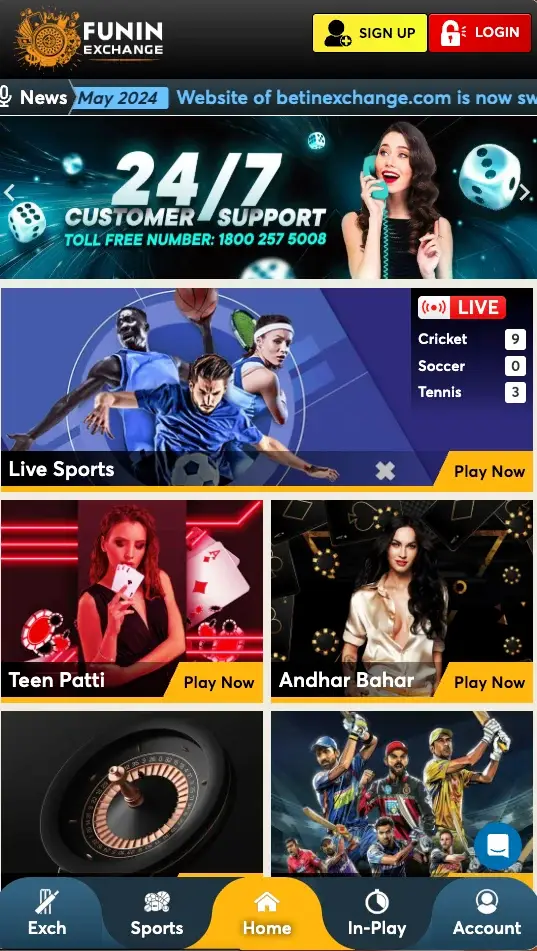
Deposits: Fund Your Funny Exchange Account
Step 1: Locate the Deposit Button
Once logged in, look at the top header of your dashboard. You will see a button labeled “Deposit” on the left side of the navigation bar.

Step 2: Choose Your Payment Method
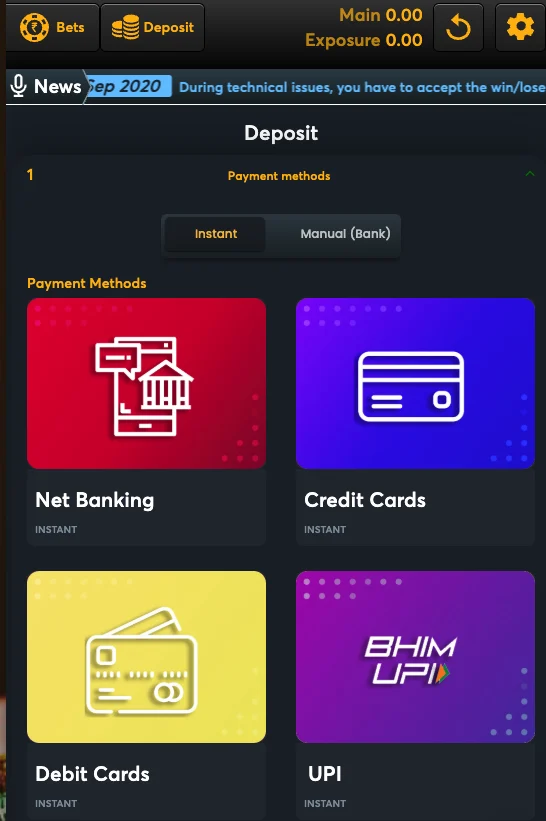
When you click the Deposit button, you will see two main options:
Option 1: Instant Payment Methods
These are processed immediately and provide the fastest funding for your Funny Exchange account.
Available Instant Payment Methods:
- 🏦 Net Banking – Direct bank transfer from your account
- 💳 Credit Cards – Visa, Mastercard accepted
- 💳 Debit Cards – All major debit cards
- 📱 UPI – Unified Payments Interface
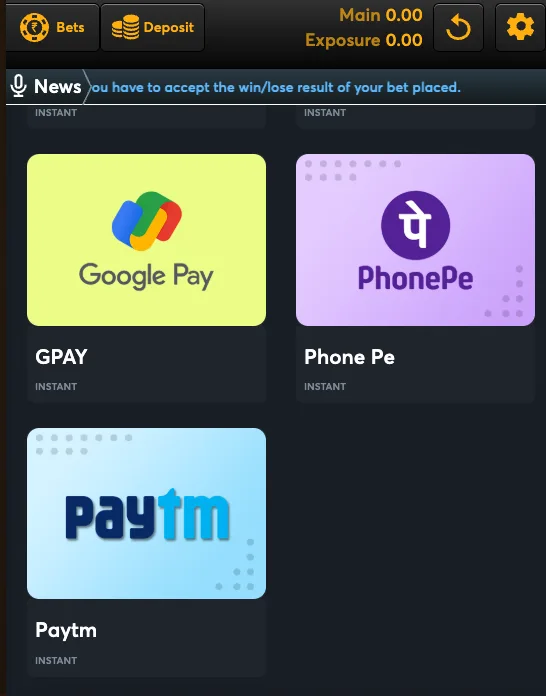
- 📱 Google Pay – Quick mobile payment
- 📱 PhonePe – Instant mobile transfer
- 📱 Paytm – Paytm wallet and bank transfer
Processing Time: Instant to 1 minute
Supported Currencies: INR and multiple international currencies through our multi-currency payment integration
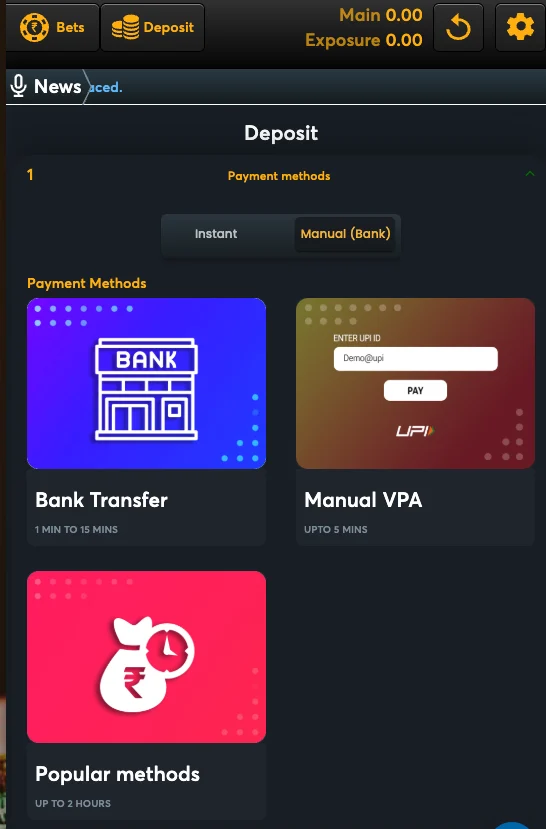
Option 2: Manual Bank Transfer
For users who prefer traditional banking or have specific requirements.
Manual Payment Methods:
- Manual Bank Transfer – Direct NEFT/RTGS to our account
- Manual VPA Transfer – UPI transfer to designated VPA
- Popular Methods – Alternative payment channels
Processing Time: 2-4 hours (depending on bank)
Best For: Large deposits or users without instant payment access
Step 3: Enter Deposit Amount
- Select your preferred payment method
- Enter the amount you wish to deposit
- Verify the amount is correct
- Proceed to payment gateway
Deposit Limits:
- Minimum Deposit: ₹500 (or equivalent in your currency)
- Maximum Deposit: Varies by payment method
- Daily Limit: Check your account for personalized limits
Image Placement: Amount entry screen
Alt Text: Deposit amount entry form on Funny Exchange showing minimum and maximum limits
Step 4: Complete Payment
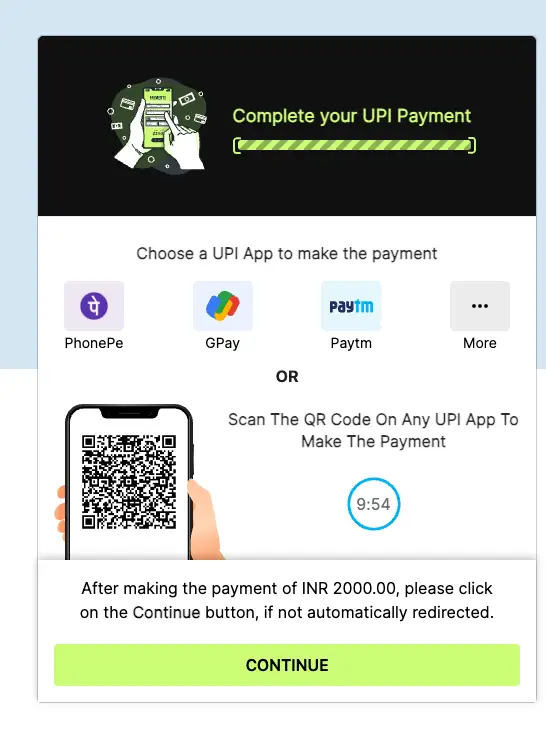
You will be redirected to our secure payment gateway powered by Unlimit, a leading multi-currency payment processor.
Our Payment Integration:
We use Unlimit Payments – a global payment solution supporting multiple currencies and payment methods. This ensures:
✅ Bank-Level Security – Industry-leading encryption
✅ Multi-Currency Support – Accept payments in multiple currencies
✅ Instant Processing – Real-time fund transfers
✅ Global Reach – Support for international players
✅ Fraud Protection – Advanced security checks
- Follow the payment gateway instructions
- Enter your payment details securely
- Complete the transaction
- Receive confirmation immediately
Step 5: Funds Appear in Your Account
Once payment is confirmed, your balance is updated instantly. You can:
- Start playing the Funny Exchange Game immediately
- Claim your welcome bonus (if eligible)
- View your transaction history
Deposit Tips:
💡 Deposits made during business hours are usually instant
💡 Deposits after hours are processed at the next business hour
💡 Always use your registered account details
💡 Save your transaction reference for records
Withdrawals: Withdraw Your Winnings Safely
Withdrawing your winnings on Funny Exchange is straightforward. Follow these steps to access your funds securely.
Important: Check Your Balance First
Before initiating a withdrawal, ensure you have sufficient funds in your Main Balance. You can check your current balance at the top header of your dashboard.
Step 1: Navigate to Withdrawal Section
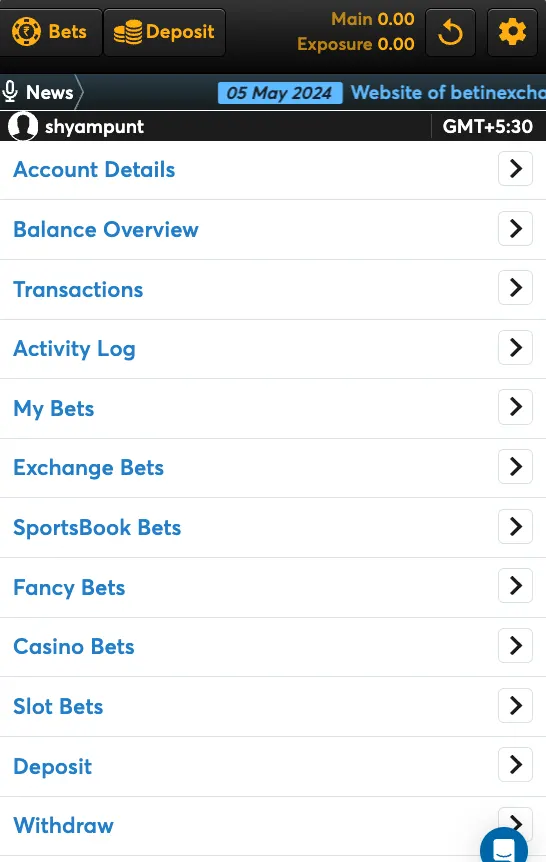
- Log into your Funny Exchange account.
- Go to the bottom navigation bar and click on “Profile”.
- In the profile menu, scroll down to the bottom.
- Click on the “Withdraw” option.
Step 2: Enter Withdrawal Amount
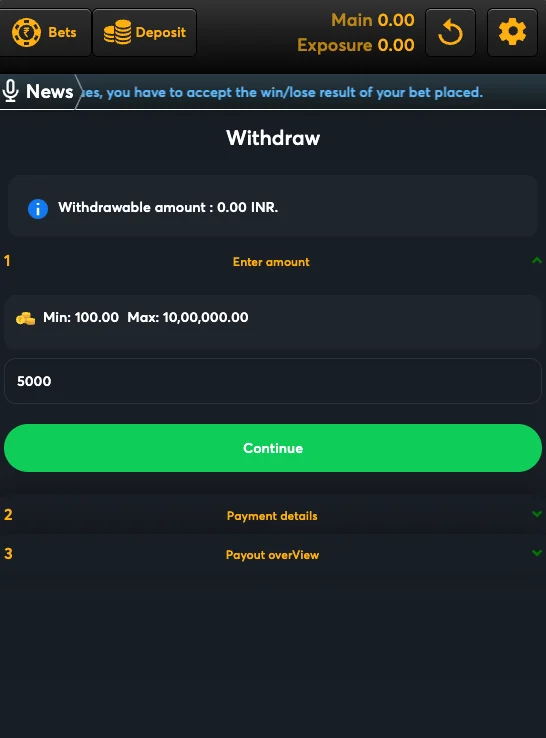
- You will be prompted to enter the amount you wish to withdraw.
- Ensure the amount is within the limits:
- Minimum Withdrawal: ₹100.00
- Maximum Withdrawal: ₹10,00,000.00
- Click “Next” or “Proceed”.
Step 3: Enter Payment Details
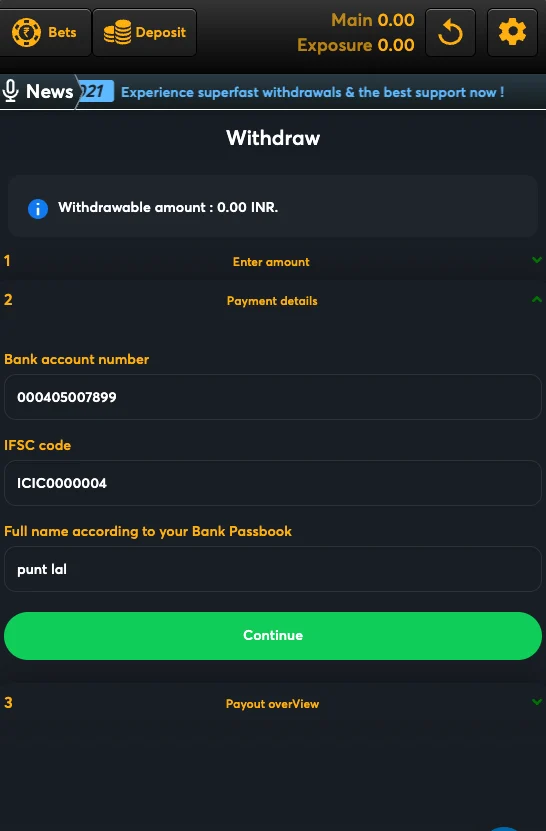
To receive your funds securely, you must provide accurate bank details. Ensure these match your registered identity.
Required Details:
- 🏦 Bank Account Number: Double-check for accuracy.
- 🏛️ IFSC Code: Your bank branch code.
- 👤 Full Name: Must match your bank passbook exactly.
Note: Mismatched names or incorrect details will lead to failed transactions.
Step 4: Payout Overview
- Review the Payout Overview screen.
- Verify:
- Withdrawal Amount
- Bank Details (Account, IFSC, Name)
- Processing Fee (if applicable)
- Confirm the request.
- You will receive a transaction ID for tracking.
Step 5: Monitor Your Withdrawal
You can track your withdrawal status anytime:
- Go to Profile → Transaction History.
- Find your withdrawal using the transaction ID.
- View real-time status updates.
Withdrawal Status Indicators:
- Pending – Awaiting processing
- Processed – Sent to your bank
- Completed – Funds received in your account
- Failed – Issue detected; contact support
Multi-Currency Payment Support
Funny Exchange supports players from around the world with our advanced multi-currency payment system integrated with Unlimit Payments.
Supported Currencies:
- 🇮🇳 INR (Indian Rupee) – Primary currency
- 🌍 USD, EUR, GBP – International currencies
- 🌏 Other Regional Currencies – Depending on player location
Currency Conversion:
- Real-time exchange rates applied
- Transparent fee structure
- No hidden conversion charges
- Competitive rates vs. market standard
Security: Your Funds Are Protected
Encryption & Security Standards
All transactions on Funny Exchange are protected by:
🔒 SSL Encryption – All data transmitted securely
🔒 PCI-DSS Compliance – Payment Card Industry standards
🔒 Fraud Detection – Real-time transaction monitoring
🔒 Two-Factor Authentication – Optional extra security layer
🔒 Secure Gateway – Unlimit payment processor certification
Learn more in our Privacy Policy.
Safe Deposit Practices
Only deposit from your own account
Never share your login credentials
Use secure internet connections
Verify the website URL before entering details
Enable two-factor authentication
Check Responsible Gaming limits
Transaction Limits & Responsible Gaming
Daily and Monthly Limits
Funny Exchange implements limits to promote responsible gaming:
| Limit Type | Amount | Purpose |
|---|---|---|
| Daily Deposit Limit | Varies by account | Control daily spending |
| Monthly Deposit Limit | Varies by account | Monitor monthly budget |
| Daily Withdrawal Limit | Varies by verification | Prevent rapid fund movement |
| Monthly Withdrawal Limit | Varies by verification | Ensure account security |
You can adjust these limits anytime through Account Settings → Responsible Gaming Tools.
Wagering Requirements
Bonuses come with wagering requirements before withdrawal:
- Example: 5x bonus = must play through 5 times before withdrawal
- Check FAQ for specific bonus terms
- Review Terms & Conditions for full details
Troubleshooting: Common Deposit & Withdrawal Issues
Deposit Not Appearing?
Problem: Funds deducted but not credited to account
Solution:
- Wait 5-10 minutes for processing
- Check your bank confirmation
- Verify transaction ID
- Contact Support with transaction details
Withdrawal Delayed?
Problem: Withdrawal taking longer than expected
Solution:
- Check estimated processing time (varies by method)
- Ensure your account is verified through KYC
- Verify withdrawal details are correct
- Contact support with your Transaction ID
Payment Gateway Error?
Problem: Error message during payment
Solution:
- Refresh the page and try again
- Try a different payment method
- Check your bank’s fraud settings
- Contact Support
Withdrawal Rejected?
Problem: Withdrawal request declined
Possible Reasons:
- Account not fully verified
- Bonus wagering incomplete
- Exceeding daily/monthly limits
- Account under review
- Incorrect withdrawal details
Solution: Contact Support with your account details
Step-by-Step Visual Guide
Below is the complete flow for deposits and withdrawals on Funny Exchange:
LOGIN TO FUNNY EXCHANGE
        ↓
    [Dashboard]
        ↓
    ┌───┴───┐
    ↓       ↓
 DEPOSIT  WITHDRAW
    ↓       ↓
┌───┴──────┴────┐
│               │
INSTANT    MANUAL
METHODS    METHODS
│               │
└───┬──────┬────┘
    ↓      ↓
PROCESS  PROCESS
  1-2 min  2-4 hrs
    ↓      ↓
✅ FUNDS RECEIVED
Need More Help?
If you have questions about deposits or withdrawals:
- FAQ – Instant answers to common questions
- Support Team – 24/7 live assistance
- Contact Us – Multiple contact methods
- Social Media Support – Quick assistance via social platforms
Important Information
Before You Transact:
📋 Read our Terms & Conditions
📋 Complete KYC Verification for faster withdrawals
📋 Review Responsible Gaming guidelines
📋 Understand Rules & Regulations
Play Responsibly:
Set deposit limits, take breaks, and never gamble with money you can’t afford to lose. For support, visit our Responsible Gaming page.