
Funny Exchange Register: Create Your Account in Minutes
Welcome to Funny Exchange, the premier destination for online gaming and sports entertainment. If you’re new to Funny Exchange, creating an account is quick, easy, and secure. This guide will walk you through the registration process step-by-step so you can start enjoying the Funny Exchange Game right away.
Why Register for Funny Exchange?
Before you begin, here’s what you’ll get with a Funny Exchange account:
- Instant Access to the Funny Exchange Game
- Welcome Bonus on your first deposit
- Secure Account with advanced protection
- 24/7 Support from our dedicated team
- Multiple Payment Options for deposits and withdrawals
- Exclusive Promotions and rewards
- Mobile App for gaming on the go
Let’s get you registered!
Step 1: Visit the Official Website
Open your browser and navigate to the official Funny Exchange website:
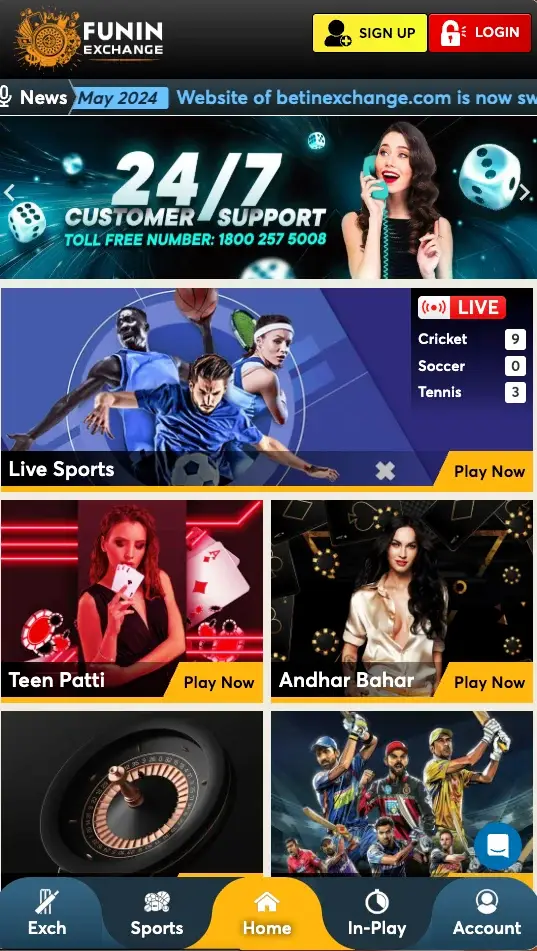
You will see the homepage with the main navigation menu at the top.
Step 2: Click the Yellow “Sign Up” Button
Look at the top header of the website. In the upper right corner, you will see a bright yellow “Sign Up” button. This is your gateway to creating a Funny Exchange account.
“Sign Up” = Register
Click the yellow “Sign Up” button to proceed to the registration page.
Step 3: Fill in Your Registration Information
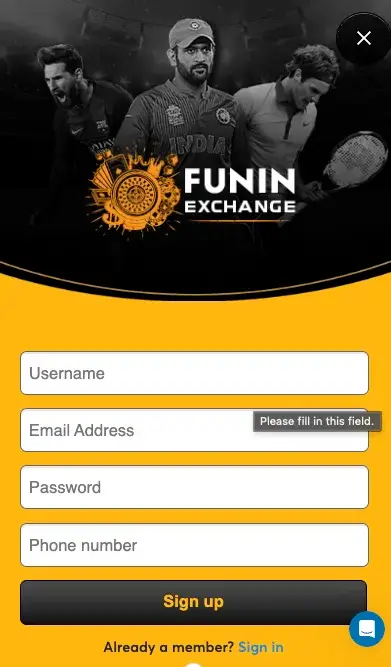
Once you click “Sign Up,” you will be directed to the registration form. You need to provide the following information:
Required Information:
Create a Username
- Choose a unique username (this is how you’ll be identified on Funny Exchange)
- Username must be 4-20 characters
- Only letters, numbers, and underscores allowed
- Example:
GamingPro123,CricketFan_05
Pro Tip: Choose a username you’ll remember easily for your Funny Exchange login.
Valid Email Address
- Enter a working email address you check regularly
- This will be used for account recovery and important notifications
- You will receive a verification code at this email
- Example:
yourname@gmail.com
Important: Use an email you can access. You’ll need to verify it during registration.
Phone Number
- Enter your active mobile phone number
- Include country code if applying (e.g., +91 for India)
- This is essential for OTP verification and account security
- Example:
+91 9876543210
Note: We use your phone number for two-factor authentication and account recovery.
Create a Strong Password
- Your password is crucial for account security
- Must be at least 8 characters long
- Must contain:
- At least one UPPERCASE letter (A-Z)
- At least one lowercase letter (a-z)
- At least one digit (0-9)
- At least one special symbol (@, #, $, %, etc.)
Example of Strong Password: SecurePass@123
Password Tips:
- Don’t use your username or email in your password
- Avoid common words and sequential numbers
- Make it unique to Funny Exchange
- Store it in a safe place
- Never share it with anyone
Step 4: Accept Terms & Conditions
Before proceeding, you must agree to our policies:
Read our Terms & Conditions
Read our Privacy Policy
Understand our Rules & Regulations
Review Responsible Gaming guidelines
You will see a checkbox stating something like:
“I have read and agree to the Terms & Conditions and Privacy Policy”
Check this box before continuing.
Step 5: Submit Your Registration
Once you’ve filled in all required information and agreed to the terms, look for the “Register” or “Sign Up” button at the bottom of the form.
Click this button to submit your registration.
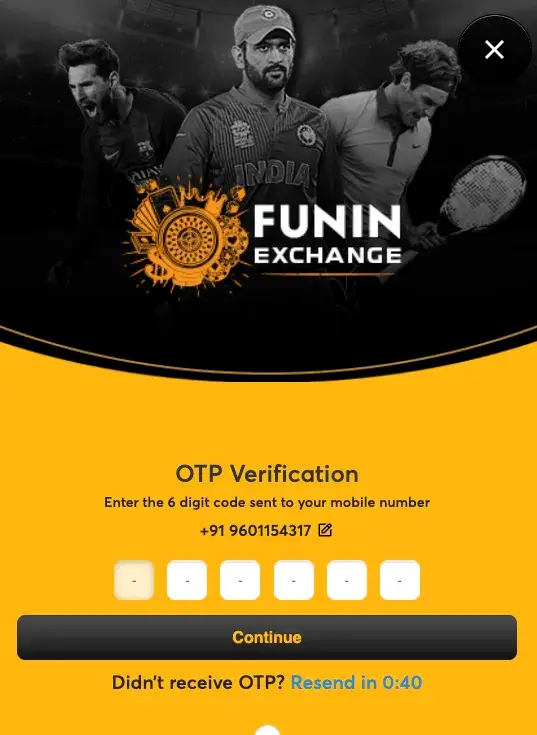
Step 6: Verify Your OTP (One-Time Password)
After submitting your registration, Funny Exchange will send a verification code to your phone number.
OTP Verification Steps:
- Wait for OTP: You will receive a text message (SMS) with a 6-digit code
- Enter OTP: A new page will appear asking you to enter this code
- Input the Code: Type the 6-digit OTP exactly as received
- Confirm: Click “Verify” or “Confirm”
OTP Example:
You have received:
Funny Exchange OTP: 675543
Valid for 10 minutes
Important Notes:
- OTP expires in 10 minutes
- If expired, you can request a new OTP
- Check your spam folder if you don’t receive it
- Do not share your OTP with anyone
Step 7: Registration Complete – Redirect to Login
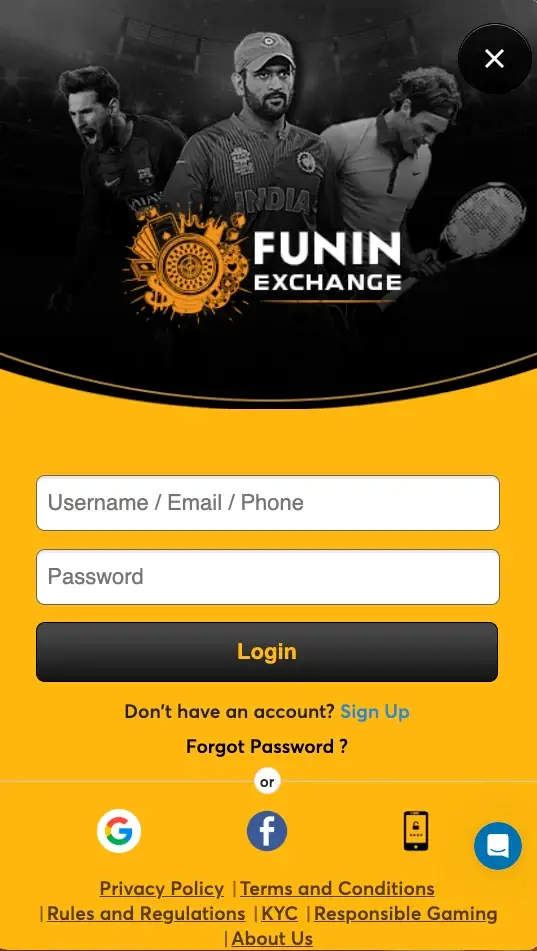
Congratulations! Once your OTP is verified, you will automatically be redirected to the Funny Exchange login page.
You can now log in using any of the following credentials:
- Your Username
- Your Email Address
- Your Phone Number
Plus your Password
Step 8: Log In and Get Started
Now that you’re registered, log in to your new Funny Exchange account:
- Go to the Login Page
- Enter your username, email, or phone number
- Enter your password
- Click “Login”
You will now access your Funny Exchange dashboard!
What Happens After Registration?
Welcome Bonus
Once you log in and complete your first deposit, you’ll receive a welcome bonus. Check our FAQ for current bonus details.
Complete KYC Verification
To unlock full features and faster withdrawals, complete your KYC verification by providing:
- Government-issued ID
- Proof of address
Make Your First Deposit
Visit the Withdrawals & Deposits page to fund your account using:
- Net Banking
- Credit/Debit Cards
- UPI
- Digital Wallets
- More options available
Start Playing
Once registered and funded, explore the Funny Exchange Game:
- Cricket & IPL betting
- Soccer betting
- Casino games
- iGaming options
- And much more!
Registration Tips & Best Practices
Do’s:
✓ Use a strong, unique password
✓ Keep your email and phone number updated
✓ Enable two-factor authentication for extra security
✓ Save your username in a secure location
✓ Use accurate personal information for KYC
✓ Read all policies before agreeing
Don’ts:
✗ Share your password with anyone
✗ Use weak passwords
✗ Register multiple accounts (violation of Terms & Conditions)
✗ Provide false information
✗ Use someone else’s email or phone
✗ Ignore security warnings
Troubleshooting Registration Issues
“OTP Not Received”
Problem: Didn’t receive your verification code
Solutions:
- Check your spam/junk folder
- Wait 2-3 minutes before requesting new OTP
- Verify your phone number is correct
- Try again with a different phone if possible
- Contact Support
“Username Already Exists”
Problem: Your chosen username is taken
Solution:
- Choose a different username (add numbers or characters)
- Example: If
GamingProis taken, tryGamingPro123 - Try again with the new username
“Invalid Email Address”
Problem: Email format not recognized
Solution:
- Ensure email format is correct:
name@domain.com - Check for typos
- Use a valid email provider (Gmail, Yahoo, Outlook, etc.)
“Password Doesn’t Meet Requirements”
Problem: Your password doesn’t meet security standards
Solution:
- Ensure password is at least 8 characters
- Add an UPPERCASE letter
- Add a lowercase letter
- Add a digit (0-9)
- Add a special symbol (@, #, $, %, etc.)
“Something Went Wrong”
Problem: Generic error message during registration
Solutions:
- Refresh the page and try again
- Clear your browser cache and cookies
- Try a different browser
- Check your internet connection
- Contact Support
Welcome to Funny Exchange!
You’re just a few clicks away from joining thousands of satisfied players on Funny Exchange. Our platform offers a secure, fair, and entertaining gaming experience with:
- Exciting Games – Cricket, casino, sports, iGaming
- Attractive Bonuses – Welcome bonus and ongoing rewards
- Security – Advanced encryption and fraud protection
- 24/7 Support – Help whenever you need it
- Mobile-Friendly – Play on any device
Ready to get started?
Click the yellow “Sign Up” button now and begin your Funny Exchange journey!