
Funny Exchange Login – How to Login & Troubleshoot Common Issues
Having trouble logging into Funny Exchange? Don’t worry—our complete login guide has you covered. We break down the entire login process into easy steps and address the most common problems players face. From Enter key issues to redirect errors, find quick solutions that actually work. Learn how to create a new account, reset forgotten passwords, and troubleshoot browser-related problems. Our step-by-step instructions and expert tips ensure smooth access to your gaming account every time. Perfect for both beginners and experienced players. Follow our proven methods and get gaming instantly without technical headaches or delays.
Table of Contents
How to Login to Funny Exchange
Logging into Funny Exchange is straightforward. Follow these simple steps to access your account:
Step-by-Step Login Process:
- Visit the official Funny Exchange website (funnyexchangegame.com or funnyexchange.com)
- Click on the Login button on the homepage
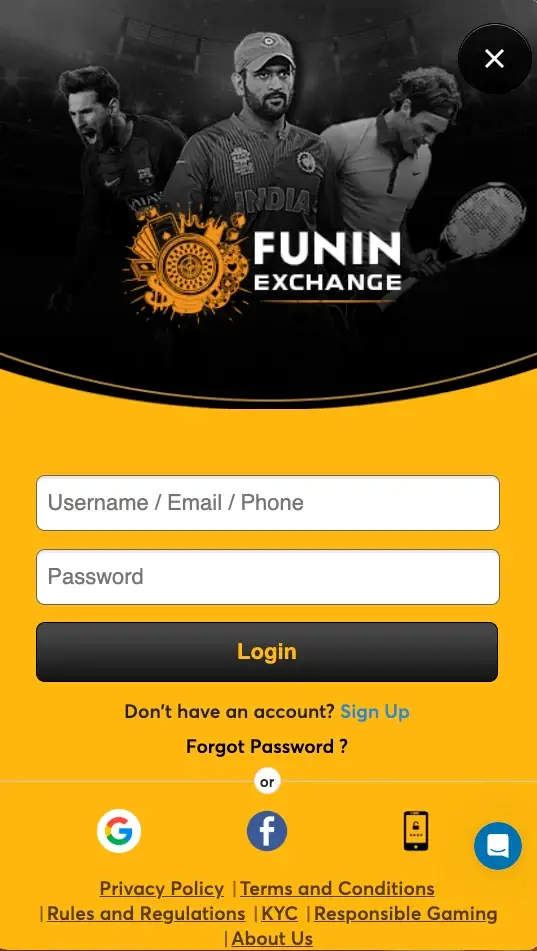
- Enter your Username, Email, or Phone Number in the first field
- Enter your Password in the second field
- Click the Login Button (do not press Enter key as it may not work)
- You will be redirected to your dashboard/home page
Important: Use the mouse to click the Login button. The Enter key may not be configured for login functionality on the platform.
Don’t Have an Account? Create One Now
If you’re new to Funny Exchange, you’ll need to create an account first. Here’s what you need:
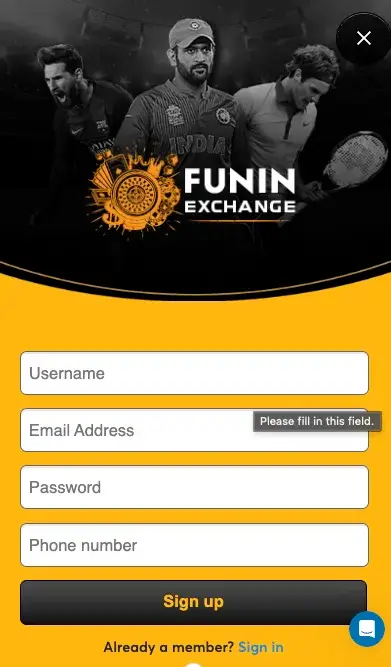
Sign Up Requirements:
- Username (your unique identifier)
- Email address
- Phone number
- Password (create a strong one)
- OTP verification (one-time password sent to your registered phone/email)
How to Sign Up:
- Click on the Sign Up or Register button on the homepage
- Fill in all required fields: username, email, phone number
- Create and confirm your password
- Enter the OTP (One-Time Password) you receive
- Complete the verification process
- Your account is now active, and you can login with your new credentials
Common Funny Exchange Login Problems & Solutions
Problem 1: Enter Key Not Working During Login
Symptom: You’ve entered your username and password, pressed Enter, but nothing happens.
Why This Happens: The Enter key functionality is not yet configured on the Funny Exchange login page.
Solution:
- Instead of pressing Enter, manually click the Login button with your mouse
- This will process your login request correctly
Problem 2: Redirected to Home Page Without Logging In
Symptom: After clicking Login, you’re sent to the home page, but you’re not actually logged in. Your account dashboard doesn’t appear.
Why This Happens: Session or cookie-related issues can cause improper login redirection.
Solution:
- Refresh the entire website (press Ctrl+R or Cmd+R)
- Re-enter your login credentials completely
- Click the Login button manually
- Wait for the page to fully load
- You should now be properly logged in
Problem 3: Login Button Doesn’t Respond
Symptom: You click Login, but nothing happens at all.
Why This Happens: Browser cache, cookies, or JavaScript issues can block the login functionality.
Solution:
- Clear your browser cache (Ctrl+Shift+Delete or Cmd+Shift+Delete)
- Clear cookies for the Funny Exchange domain
- Open a new browser tab (Ctrl+T or Cmd+T)
- Go to the official website again: funnyexchangegame.com or funnyexchange.com
- Navigate to Login and try again
- This resolves 95% of login issues
Problem 4: “Page Won’t Load” or “Connection Error”
Symptom: The login page takes too long to load or shows an error message.
Why This Happens: Network connection issues, outdated browser, or website server problems.
Solution:
- Check your internet connection is stable
- Refresh the page (F5 or Cmd+R)
- Try using a different browser (Chrome, Firefox, Safari, Edge)
- Disable browser extensions that might interfere with the site
- Try logging in from a different device or network
Complete Troubleshooting Checklist
If you’re still experiencing login issues, follow this complete troubleshooting sequence:
- ✓ Clear Browser Cache: Ctrl+Shift+Delete (or Cmd+Shift+Delete on Mac)
- ✓ Clear Cookies: Go to browser settings → Privacy → Clear browsing data
- ✓ Close All Browser Tabs: Close the browser completely and restart it
- ✓ Open New Tab: Use Ctrl+T or Cmd+T to open a fresh tab
- ✓ Visit Official Website: Go to funnyexchangegame.com directly
- ✓ Navigate to Login Page: Click the Login link/button
- ✓ Enter Credentials Slowly: Type your username/email and password carefully
- ✓ Click Login with Mouse: Never use the Enter key
- ✓ Wait for Full Page Load: Give the page 3-5 seconds to load completely
- ✓ If Redirected Without Login: Refresh immediately and re-login
Frequently Asked Questions (FAQ)
Why does my login say “Invalid Credentials”?
Ensure you’re entering the correct username/email and password. Check if Caps Lock is on. If you’ve forgotten your password, click “Forgot Password” and reset it using your registered email or phone number.
Can I use Email instead of Username to login?
Yes, Funny Exchange allows login with username, email, or phone number. Use whichever credential you prefer.
How do I reset my forgotten password?
Click the “Forgot Password” link on the login page. Enter your registered email or phone number. You’ll receive an OTP. Use the OTP to reset your password.
Is my Funny Exchange login secure?
Yes, Funny Exchange uses encrypted connections (HTTPS) to protect your login information. Never share your password with anyone.
Why am I logged out automatically?
Session timeout occurs after a period of inactivity (usually 30 minutes) for security reasons. Simply login again to resume playing.




Pingback: Funny Exchange Rules & Policies: Complete User Guide2026
Pingback: Is Funny Exchange Real or Fake? Truth 2026
Pingback: Is Funny Exchange Safe? Full Review 2026
Pingback: Funny Exchange APK Safe Download Guide 2026